It’s important to reach your brand’s audience where they are most active. And if the target audience spends a significant portion of time on LinkedIn, even if it’s checking their newsfeed once a day, then it’s time to learn how to start a LinkedIn newsletter.
LinkedIn allows its members to subscribe to newsletters, allowing brands to talk to professionals about a specific topic, like a service, product, company update, or another relevant business update.
Starting a newsletter through the platform means engaging with the audience as soon as the article is published.
How to Create LinkedIn Newsletters for Your Business
First, the business will need a company page. If it doesn’t have one established, it can be easy to setup by following instructions from the platform.
After establishing a company page, setting up a newsletter for the company page takes only mere minutes. It can then be incorporated into the brand’s monthly distribution calendar.
1. Grant Admin Access
The team member(s) or marketing team responsible for the newsletter will need proper page access — either super admin or content admin.
Granting access is easy, simply open Admin Tools, then select Manage Admins. From here, select Add Admin, use the search bar to find their profile, then grant either super or content admin.

2. Create LinkedIn Newsletter for the Business
Once the admin is established, navigate to the company page. This step is important as it ensures the content is being published from the proper page — especially if the admin has access to multiple pages, or if there is more than one page associated with the business.
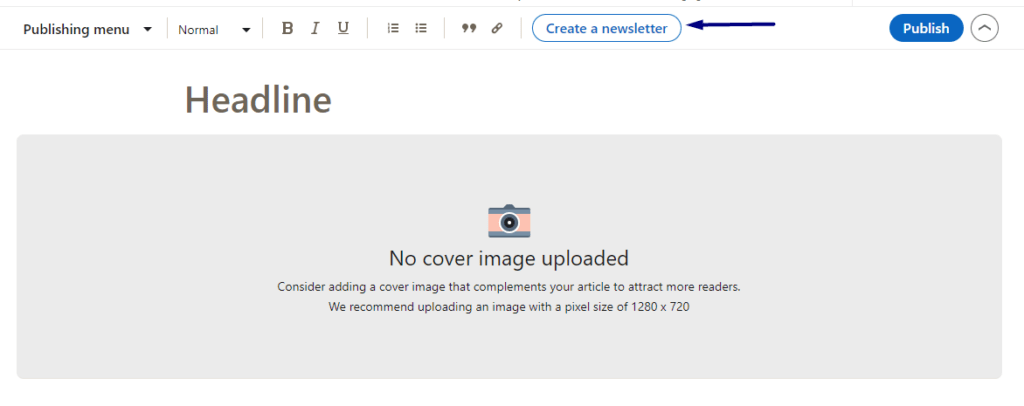
While viewing the proper company page, navigate to the post composer, then select Write Article.

From here, users will be directed to the publishing interface.
Navigate to the top menu bar, then select Create a Newsletter. From here, users will be able to enter the details of the newsletter. It’s important to use a title and description that will encourage followers to subscribe in addition as to what they can expect from the newsletter.
The next step is to select publishing frequency, which ranges from daily to monthly. Depending on the type of business and audience, one frequency may be better than another. But the frequency can be changed as needed.
In this section, the creator will be prompted to add an image for the newsletter. This image will appear on the newsletter page so it’s ideal to select one that works for the brand in its entirety, rather than a product or service-specific image.
Write the First Issue
Much like LinkedIn articles, the newsletter function allows for a generous wordcount, more than enough, actually. Admins can expect a space limit of ten thousand words. If you have ever created an email marketing campaign, you’ll know that this is more than enough space.
There is also space to create headings and subheadings, ensuring the content is easy to read and is well-organized.
LinkedIn newsletters support an array of creative assets. Creators can add a cover image to the newsletter, giving subscribers a reason to click through and read — which is the goal, after all, for marketing efforts.
Admins can also insert images, videos, or GIFs throughout the newsletter. This capability allows for businesses Click the icon in the left margin to open the multimedia toolbar.
LinkedIn newsletter has an autosave function, so creators never have to worry about losing their work if something should happen.

After reviewing the newsletter with a fine-tooth comb, it’s time to publish. This can either happen immediately, or at a later time. As of August 2022, creators do not have the option to schedule a newsletter.
Plan for Future LinkedIn Newsletters
After deploying the first company newsletter on LinkedIn, it’s time to start planning subsequent issues. Similar to email marketing, it’s important to maintain a regular publishing frequency.
If the marketing strategy doesn’t include publishing on a regular basis or if you want to write about a topic that doesn’t fit the newsletter, it’s possible to still share the URL related to the content as a post on LinkedIn.
After sending the first issue, LinkedIn automatically notifies everyone who follows the company page. Followers can click the notification to subscribe and begin reading the newsletter.
But after the first issue, getting new subscribers tends to be a little tougher. Primarily because LinkedIn won’t continue to notify page followers about the company newsletter if they haven’t opted to subscribe yet.
So how brands continue to put content in front of new audience members?
One way is to reshare the newsletter issues to the company page. Navigate to the newsletter page and find the issue you want to share.
Click the Share button underneath the content and select the appropriate page. Then write a post to encourage followers to read or subscribe to the newsletter.
Alternatively, you can copy and paste the link to the newsletter issue into a new post on the company page. Then write a caption and publish the post to the company page. Although sharing a link to a specific newsletter can help gain engagement for that issue, sharing the link for the overarching newsletter page will help to gain more subscribers.
To do this, simply click Share from the newsletter page. It can also be shared to another platform, like Facebook for example.
In the likelihood that this sounds like an overwhelming task, or if you simply don’t have time to give a newsletter the care and attention that is needed, it’s time to facilitate the help of a team of professionals.
It starts with a tailored strategy to fit your brand, complete with well-written content, and a social media presence to help gain followers.
Working with a team that is well-versed in creating a brand identity, email marketing, and knowing how to find the target audience can be the key to finding success for the company in its marketing efforts.