Videos, podcasts, and the written word are all forms of content, which takes time and a tailored content strategy to bring it to life.
Once the content is posted on the brand’s website or distributed to the audience list, it can be discouraging if it isn’t read, watched, or listened to.
How someone prefers — or needs to consume content might be different than how another person chooses to interact with it. So how do you create content that the audience wants to consume?
Without changing a word or the voice, it is possible to create content your consumers will find easy to consume.
1. Create Chapters for Videos & Podcasts
Videos and podcasts can be a wealth of knowledge for consumers. But if the content contains some information they already have, the consumer may want to skip to another section.
Without chapters — or markers, the viewer or listener might miss the section they’re searching for. It can also be beneficial if they have to leave and return to the content later or on another device.
These markers let them know where they left off and what’s to come.
YouTube allows for the use of timestamps and visuals to indicate chapters within the video. Using this feature helps the consumer find exactly what they’re looking for in just a matter of moments.
Publishing videos on YouTube makes sense for every brand and to make things easier, the YouTube Creators channel has a step-by-step video showing how to add chapters.
Even though the instructional video is under two minutes, it includes chapters so the user can find the section they need.
Timestamps are beneficial for podcasts as well. Like videos, the chapter indicator lets the listeners go to the section they want to hear. Although most hosting platforms are different, most allow brands to include timestamps in the show notes or episode description.
Platforms, like Captivate, typically have instructions indicating how to add timestamps for each episode.
2. Audio Option
There are quite a few of us who still enjoy reading, but that doesn’t mean we don’t enjoy having the option of audio.
News outlets like The Washington Post have included the audio option for several of its articles. This capability is indicated by a headset icon under the byline.
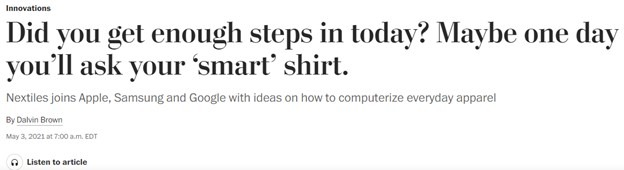
The audio option was originally introduced on the Android and iOS apps in 2021, but has since expanded across all platforms.
This technology is not only beneficial from a consumption standpoint so that the audience can multitask, but it is also beneficial for those with visual impairments. Yes, accessibility tools can transform text to audio, but why not offer an inclusive option for the audience?
3. Provide Transcripts
Providing a transcript to coincide with a video or podcast gives those who prefer to read the option of doing so, but it also provides a means for the hearing impaired.
Videos allow for closed captioning to appear as it plays, but this can be easier for some than it is for others. And if the option is available, why not give the audience what they want?
Video transcriptions also offer a benefit for SEO by allowing search engines to get a better understanding of content featured in the video and can improve its organic ranking.
4. Offer a Time Estimate
It is becoming more and more common for websites to include a reading time estimate at the beginning of an article or blog post next to the byline and published date.
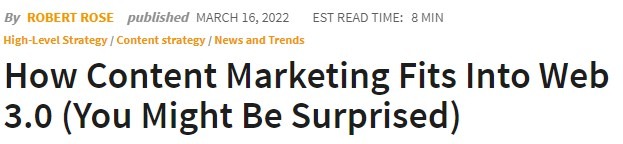
A time estimation lets the reader know roughly how long it will take to get through the content — and ultimately decide if they have time now or if it has to be saved for later.
It also gives the reader an indication of whether a deep dive is taken into the topic or if it’s a brief overview.
Another option is to include a reading progress bar at the top of the content.
A Reading Progress Indicator is typically a horizontal bar or text indicator that tells the reader how far they have scrolled and estimates how much of the page is left. This indicator can also be used for pages containing surveys or quizzes as it can help the user to know if they are almost at the end or if there is still a bit left.
5. Linked Table of Contents
Similar to timestamps, a table of contents is a text-based guide that can be used to let the readers skip through the text or find the section they want. A table of contents can offer a lot of benefits to the audience but using a linked table of contents can make this even easier.
This method works well for longform documents and content that covers several areas of subject matter. Content creators don’t need a separate tool to create a linked table of contents. Instead, HTML anchor links can be used.
Update Your Brand’s Content Strategy
Incorporating any number of these tips into your content marketing efforts can make a difference for your audience and increase their overall perception of the brand — brand perception can be essential.
This additional effort creates the opportunity to retain current consumers or audience members while gaining new members.
It may feel daunting to put these tactics to the test for your brand, making it essential to work with a team of marketers who have put their knowledge to the test time and time again.
Tailored strategies and execution are all in a day’s work for the team at Elevation Ten Thousand. To discover how we can help increase the content consumption of your brand, contact us today.