This article was updated on May 9, 2022.
Business owners and brand managers may find shooting a video on their smartphone to be the easiest or best option. But all too often these videos are too hard to see, hear, and/or follow. But following these seven tips can help you to become an iPhone video expert rather quickly, and your brand’s video productions will prove it.
The difference in the finished product will be apparent, resulting in a high-quality video that showcases products and services.
Hold the Phone Horizontally
A video that is recorded while the phone is held in a vertical position will result in the sides being cropped out and the viewer doesn’t get to see the full picture — literally.
Even though platforms like Snapchat have conditioned many of us to record videos in a vertical position, it only works for that platform.
Then, if you transfer a vertical video into most any platform — like YouTube or Facebook, the picture will be shrunk to fit a full-frame view. This makes it even harder to see what has been filmed.
If you start shooting video vertically, then switch it to be horizontal, the phone will flip the shot onto its side, which isn’t good either. Always start the recording by holding the phone horizontally.
An easy way to remember this is our eyes are horizontal, not vertical. So, you should hold your phone horizontally, not vertically.
Keep the Phone Steady
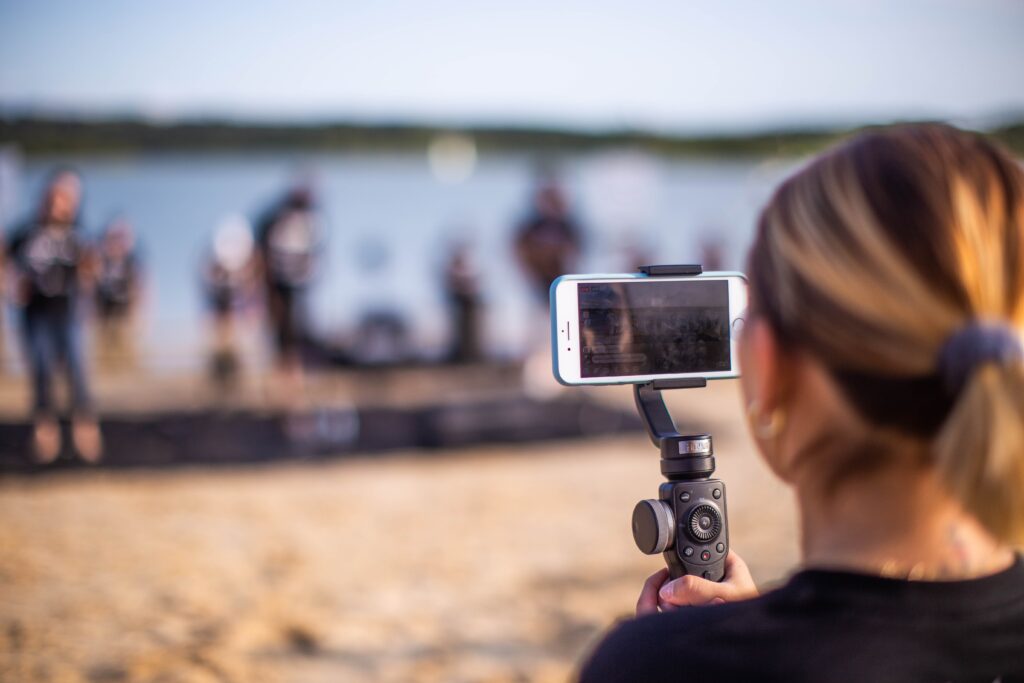
Unless you are able to keep your hands as steady as a surgeon, it would be ideal to use a tripod or other stabilizer. Getting a small tripod for your phone would be best, or a gimbal stabilizer.
A gimbal is a tool or accessory with motors or intelligent sensors used in photography or videography to support and stabilize the camera. It allows for the operator to achieve a smooth filming or shooting process.
A stabilizer or tripod will also balance the weight of the phone, but it is simpler to use. A gimbal has multiple moving parts, whereas a stabilizer offers an easier execution. Depending on the needs of the business and the project, one may be better than another.
Whether you’ve created a few walk-around-style videos for your dealership or how-to videos, holding the phone steady is essential.

There are a variety of gimbals on the market designed to stabilize your iPhone, smartphone, or camera. Price points can range from approximately $100 and higher.
Aside from working with a professional, adding a gimbal or tripod to your arsenal of equipment would be a wise decision to ensure a steady video is created.
Be Mindful of Distance
Thanks to zoom capabilities, we have become accustomed to filming from a distance. But this is not the best way to shoot video on an iPhone — or any mobile device for that matter.
Standing a substantial distance from the subject and zooming in reduces the footage quality and can make it difficult to understand the audio. Instead of zooming in, it is ideal to position the phone closer to the subject so that the audio is picked up and the footage isn’t compromised.
Focus
The camera in your phone should automatically bring the subject into focus. However, there will be times when it isn’t sure what you are trying to focus on, or it focuses on the wrong thing, leading to a blurry subject.
To bring the camera into focus, tap on the screen that is showing the intended subject.
Light Source
To help bring light to an otherwise dimly lit or dark area, you are encouraged to use the phone’s flash located near the camera.
Most smartphones have an “auto” option or you can turn it manually while recording. Alternatively, most modern smartphones have a type of “night sight” which can help brighten the video without causing distortion.
Be sure to get close enough to the subject so that the light has the opportunity to illuminate it.
Sound
As important as video quality is, the audio quality is just as important — if not more so. Is there anything more frustrating than trying to watch and/or listen to a video that has poor audio? Or audio that cuts in and out?
To eliminate this issue, it’s important to be as close to the subject as possible as most iPhone microphones won’t pick up much audio — if any, from a subject that is more than a few feet away. Except of course for something loud, like an explosion or concert. But chances are, that’s not what you’re looking to film.
So, to improve a product video, and the chances the brand’s audience will convert, it’s important to keep sound quality in mind while learning how to take — and then taking, good videos with your phone.
Background Noise
If you’re filming in an area with a lot of noise or wind, the sound you want to capture will become drowned out. If you’re filming about how to properly trim hedges in preparation of the changing seasons on a windy day or during times of heavy traffic, your voice may become lost.
There are situations where this issue is unavoidable. But that doesn’t mean you need to settle for sub-par quality or to nix the project.
Record what you need to say in a quieter room or area, either before or after filming in the louder area. Then, you can edit the voiceover and video together for a quality production without noise pollution. This also creates the opportunity to do multiple takes and choose the best audio, without having to refilm the entire video.
Get Professional Videography Services for High-Quality Videos or Films
Following these tips for smartphone video recording can help to set you up for success. But as helpful as these tips are, there will be situations where a professional is needed. Whether it’s a large-scale production or your team simply doesn’t have the bandwidth, enlisting the help of a professional is worthwhile.
Creating a video that is customized to your brand and brings your vision to life is all in a day’s work for the team of creatives at Elevation Ten Thousand. To hear how we can help, contact us today.